Important announcement

We will be carrying out essential maintenance on our payment system on Thursday, 21 May. During this time, telephone payments and counter payments (Chip and Pin) at our Community Hubs will be unavailable.

Customers can still pay for services and bills online or via our 24-hour Touchtone payment service on 0300 123 4524.

This process outlines the steps to create a non-contract request and attach one quote for the whole order.

1. Create a Non-Contract Requisition> Add the Line to the Cart
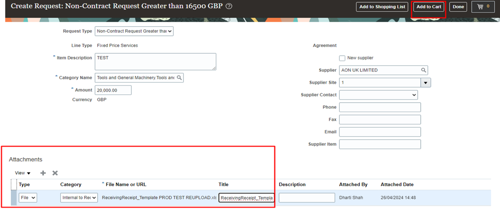
screenshot of oracle fusion create request screen with attachment section highlighte

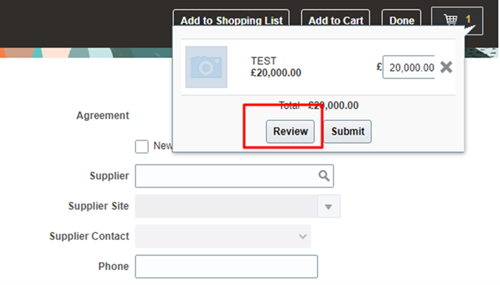
2. Review the Cart

screenshot of the review cart screen with the review button highlighted red

3. Navigate the Page to Line Level > Click on the Line added > Duplicate the Line
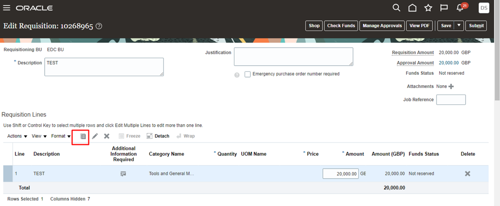
screenshot of oracle fusion with the requisition lines section highlighted red

4. This way another line would be added. You can also edit the line by clicking on pencil icon.
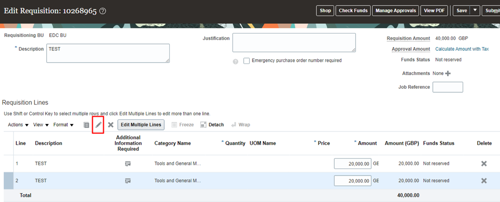
screenshot of oracle fusion edit requisition screen with pen icon highlighted red

5. If all the lines have the same attachment > Add the attachment on the Requisition header.
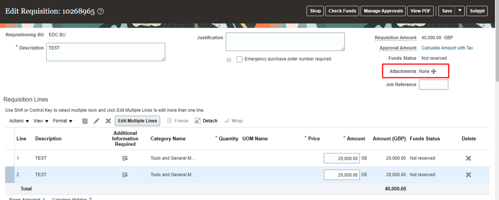
screenshot of oracle fusion with the attachments section highlighted red