Important announcement

Due to operational issues, regrettably, some of our food waste collections have been suspended. If your food caddy is not collected on its scheduled day, please take your bin in and present it on your next collection day. We apologise for the inconvenience this will cause and we’re working hard to remedy the situation.

All credit memos must be raised and approved on IRF Service User Approver.

Users who raise credit memos must request authorisation from a list of approvers. The following steps outline the process to approve a credit memo.

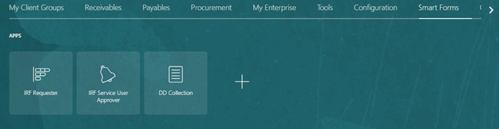
1. Select Smart Forms

Screenshot showing a cursor hovering over Smart Forms tab

2. Select IRF Service User Approver

Screenshot showing the applications within the Smart Forms tab including IRF Service User Approver

3. Complete appropriate fields
4. Select Search
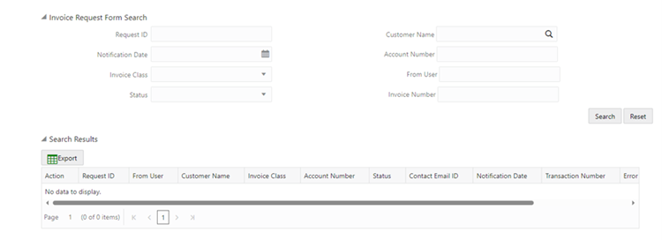
Screenshot showing the Request Form fields, Request ID, Notification Date, Invoice Class, Status. Search Results displaying below.

5. Select Request ID to view details
6. At Action, select tick to approve
7. At Action, select cross to reject and add reason for rejection

Screenshot of the search results with the Action and Request ID highlighted with a red rectangle

8. If approved, Transaction Number is displayed

Screenshot of the search results, with the Transaction number highlighted with a red rectangle